
MAKIO CORE
COMPATIBILITY
MAKIO CORE · KEMPER PROFILER
MAKIO Core uses one unified firmware for KEMPER PROFILER.
3D PRINT FILES
Six-footswitch Core case
Download the MAKIO Core enclosure files and print profile on MakerWorld. The case has been printed and assembled in PETG and ASA.
Print one top case—Plate 1 for heat-set inserts or Plate 2 for direct screw mounting—and the bottom cover on Plate 3. You do not need both top versions. Electronics, footswitches and fastening hardware are not included.
DOWNLOAD ON MAKERWORLD ↗M-BUS PIN MAP
Read the Tab5 M-Bus pin assignments
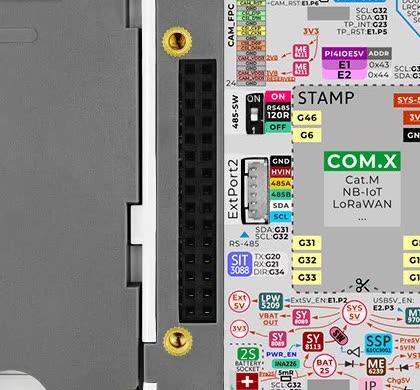
Select Footswitch 1–8, Hub · DC, or I²C · caution to show each Core reference assignment on the Tab5 rear M-Bus header.
 M-BUS · 2×15
FS1 G2, FS2 G3, FS3 G4, FS4 G45, FS5 G47, FS6 G48, FS7 G18, FS8 G19, HUB IRQ G16, HUB RX G7, HUB TX G6, DC SENSE G51, I2C SDA G31, I2C SCL G32.
DOWNLOAD MODE
Put Core in download mode
Tab5 · Upper-left detail
Green LED flashes → release
Connect the Tab5 USB-C port to your computer with a data cable. Hold the small white Reset/BOOT button beside USB-A for about 2 seconds.
FIRMWARE
MAKIO CORE FIRMWARE
Official MAKIO Core 0.1.2 is available from the firmware page.
OPEN FIRMWARE INSTALLER